Code Repositories, AI Coding Agents, IDEs & CLIs - The 2026 Developer Guide
From git init to autonomous PR agents - everything you need to ship code in 2026.
 Git Fundamentals
Before diving into platforms and agents, let's ground ourselves. Git is the distributed version control system that underpins everything. Created by Linus Torvalds in 2005, it tracks every change to every file in your project as a series of snapshots (commits) organized into branches.
Core Workflow in 30 Seconds
# Start a new project
git init my-project && cd my-project

# Create a file, stage it, commit it
echo "# My Project" > README.md
git add README.md
git commit -m "Initial commit"

# Create a feature branch
git checkout -b feature/add-auth

# Make changes, stage, commit
git add -A
git commit -m "feat: add JWT authentication middleware"

# Push to remote and open a PR
git push -u origin feature/add-auth
Branching Strategies
| Strategy | Best For | How It Works |
|---|---|---|
| GitHub Flow | SaaS, continuous deployment | main + short-lived feature branches. Merge via PR. |
| GitFlow | Versioned releases | main + develop + feature + release + hotfix branches. |
| Trunk-Based | High-velocity teams | Everyone commits to main. Feature flags gate incomplete work. |
Essential Git Config
# Identity
git config --global user.name "Your Name"
git config --global user.email "you@example.com"
# Better defaults
git config --global init.defaultBranch main
git config --global pull.rebase true
git config --global fetch.prune true
git config --global diff.colorMoved default
# Sign commits with SSH key (modern approach)
git config --global gpg.format ssh
git config --global user.signingkey ~/.ssh/id_ed25519.pub
git config --global commit.gpgsign true
# Use delta for beautiful diffs
git config --global core.pager delta
git config --global interactive.diffFilter "delta --color-only" GitHub in 2026
GitHub hosts 150M+ developers and 90% of the Fortune 100. It's the default home for open source and, with Copilot's evolution into an agentic platform, it's become the center of AI-assisted development.
GitHub Copilot - The Full Platform
Copilot is no longer just autocomplete. It's a multi-tier AI platform with 4.7 million paid users as of January 2026:

GitHub Copilot - from autocomplete to autonomous agent
| Plan | Price | Premium Requests/mo | Key Features |
|---|---|---|---|
| Free | $0 | 50 | Basic chat, 2K completions/mo, VS Code + GitHub.com only |
| Pro | $10/mo | 300 | Coding agent, code review, multi-model, all IDEs |
| Pro+ | $39/mo | 1,500 | All frontier models (Opus, o3), GitHub Spark |
| Business | $19/user/mo | 300/user | Org policies, audit logs, IP indemnity, SAML SSO |
| Enterprise | $39/user/mo | 1,000/user | Knowledge bases, custom fine-tuning, Spark |
Copilot Agent Mode (GA - March 2026)
Agent mode is now GA in both VS Code and JetBrains. It autonomously plans multi-step tasks, edits files across your project, runs terminal commands, and iterates until the job is done:
You: "Add rate limiting to the /api/users endpoint using Redis"

Copilot Agent:
  → Reading src/routes/users.ts, src/middleware/...
  → Installing ioredis dependency
  → Creating src/middleware/rateLimit.ts
  → Updating src/routes/users.ts to apply middleware
  → Running npm test... 2 failures
  → Fixing test expectations for 429 responses
  → Running npm test... all passing ✅
  → Changes ready for review
Copilot Cloud Agent - Issue → PR
The cloud agent is the game-changer. Assign a GitHub Issue to Copilot and it works asynchronously in the background:
# Assign an issue to Copilot via CLI
gh issue edit 42 --add-assignee @copilot

# Or use the GitHub UI: Issues → Assignees → Copilot

# Copilot will:
# 1. Analyze the issue and repo context
# 2. Create a branch
# 3. Write code across multiple files
# 4. Run tests and linters
# 5. Open a PR for your reviewGitHub Actions - CI/CD
Actions remains the dominant CI/CD platform with its massive marketplace. Here's a production-ready workflow:
# .github/workflows/ci.yml
name: CI Pipeline
on:
  push:
    branches: [main]
  pull_request:
    branches: [main]

jobs:
  test:
    runs-on: ubuntu-latest
    strategy:
      matrix:
        node-version: [20, 22]
    steps:
      - uses: actions/checkout@v4
      - uses: actions/setup-node@v4
        with:
          node-version: ${{ matrix.node-version }}
          cache: 'npm'
      - run: npm ci
      - run: npm test
      - run: npm run lint

  security:
    runs-on: ubuntu-latest
    steps:
      - uses: actions/checkout@v4
      - uses: github/codeql-action/init@v3
        with:
          languages: javascript
      - uses: github/codeql-action/analyze@v3

  deploy:
    needs: [test, security]
    if: github.ref == 'refs/heads/main'
    runs-on: ubuntu-latest
    steps:
      - uses: actions/checkout@v4
      - run: npm ci && npm run build
      - uses: aws-actions/configure-aws-credentials@v4
        with:
          role-to-assume: arn:aws:iam::role/deploy
          aws-region: us-east-1
- run: aws s3 sync dist/ s3://my-bucket/GitHub CLI (gh)
The gh CLI (v2.82+) now includes native Copilot integration:
# Create a repo
gh repo create my-app --public --clone

# Create a PR with auto-fill from commits
gh pr create --fill --web

# Watch CI status live
gh run watch

# Trigger a workflow manually
gh workflow run deploy.yml -f environment=staging

# Use Copilot in the terminal
gh copilot suggest "find all TODO comments in TypeScript files"
gh copilot explain "git rebase -i HEAD~5"

# Assign an issue to Copilot cloud agent
gh issue edit 42 --add-assignee @copilot
GitHub Copilot CLI - Full Agentic Terminal (GA April 2026)
This is a complete reimagining - not just gh copilot suggest. It's a full agentic coding tool competing with Claude Code:
# Start an agentic session
copilot-cli
# It can: read/write files, explore repos, run tests,
# self-correct, open draft PRs, and spawn sub-agents
# Parallelize work with fleet mode
/fleet "implement auth module" "write tests" "update docs"
# Structured planning before execution
/plan "migrate database from PostgreSQL to DynamoDB" GitLab in 2026
GitLab serves 31M+ users and holds the #1 spot in Gartner's Magic Quadrant for DevOps Platforms. Its structural advantage: security, compliance, CI/CD, and AI share a unified data model - a scan result links to the MR that introduced it, which links to the issue, which links to the sprint plan.
Pricing Tiers
| Tier | Price | CI Minutes/mo | Key Features |
|---|---|---|---|
| Free | $0 | 400 | 5 users max, basic CI/CD, container registry |
| Premium | $29/user/mo | 10,000 | Advanced CI/CD, SAML SSO, code owners, Duo AI included |
| Ultimate | Custom (~$99) | 50,000 | 8+ security scans, compliance, DORA metrics, full Duo |
GitLab Duo - AI-Native DevSecOps
Since GitLab 18.0 (May 2025), AI features ship natively in Premium and Ultimate. The Duo Agent Platform is the orchestration layer:
Built-in Agents
- Security Analyst - analyzes vulnerabilities, suggests remediations
- Planner - breaks down epics into issues with estimates
- CI Expert (18.11 beta) - inspects your repo and generates pipeline YAML
- Data Analyst (18.11 GA) - answers questions about MR cycle times, pipeline health
Automated Flows
- Developer Flow - analyzes issue → understands repo → writes code → opens MR
- Code Review Flow - automated MR review for quality and security
- Fix Failed Pipelines - auto-diagnoses and fixes CI/CD failures
- Vulnerability Resolution (18.11 GA) - auto-creates MRs with fixes for SAST findings
GitLab CI/CD - DAG Execution
GitLab's CI uses Directed Acyclic Graph (DAG) execution - jobs declare dependencies regardless of stage ordering, enabling 20-40% faster pipelines than stage-based models:
# .gitlab-ci.yml
stages:
  - build
  - test
  - security
  - deploy

variables:
  NODE_ENV: production

build:
  stage: build
  image: node:22-alpine
  script:
    - npm ci --cache .npm
    - npm run build
  artifacts:
    paths: [dist/]
    expire_in: 1 hour
  cache:
    key: ${CI_COMMIT_REF_SLUG}
    paths: [.npm/]

unit-tests:
  stage: test
  needs: [build]          # DAG: runs as soon as build finishes
  script:
    - npm ci
    - npm run test:unit -- --coverage
  coverage: '/Statements\s*:\s*(\d+\.?\d*)%/'
  artifacts:
    reports:
      junit: junit.xml
      coverage_report:
        coverage_format: cobertura
        path: coverage/cobertura.xml

integration-tests:
  stage: test
  needs: [build]          # Runs in parallel with unit-tests
  services:
    - postgres:16-alpine
  variables:
    POSTGRES_DB: test
    POSTGRES_PASSWORD: test
  script:
    - npm ci
    - npm run test:integration

sast:
  stage: security
  needs: []               # No dependencies - starts immediately
  include:
    - template: Security/SAST.gitlab-ci.yml

deploy-production:
  stage: deploy
  needs: [unit-tests, integration-tests, sast]
  environment:
    name: production
    url: https://myapp.com
  rules:
    - if: $CI_COMMIT_BRANCH == "main"
  script:
    - aws s3 sync dist/ s3://my-bucket/
    - aws cloudfront create-invalidation --distribution-id $CF_ID --paths "/*"
GitLab CLI (glab)
# Authenticate with your instance
glab auth login --hostname gitlab.com

# Create a merge request with auto-fill
glab mr create --fill --squash-before-merge

# Watch pipeline status live
glab ci status --live

# Validate your CI config before pushing
glab ci lint .gitlab-ci.yml

# View and retry failed jobs
glab ci list
glab ci retry 12345

# Ask Duo Chat from the terminal
glab duo chat "How do I set up SAST scanning?"
Security Scanning (Ultimate)
GitLab Ultimate includes 8+ security scan types built into the platform - no add-ons needed:
| Scan Type | What It Catches |
|---|---|
| SAST | Code vulnerabilities (SQL injection, XSS, buffer overflows) |
| DAST | Runtime vulnerabilities in deployed apps |
| Dependency Scanning | Known CVEs in third-party libraries |
| Container Scanning | Vulnerabilities in Docker images |
| Secret Detection | Leaked credentials, API keys, tokens |
| IaC Scanning | Terraform/Ansible/K8s misconfigurations |
| License Compliance | Incompatible open-source licenses |
| API Security | REST and GraphQL endpoint vulnerabilities |
GitHub vs GitLab - Head to Head
| Category | GitHub | GitLab |
|---|---|---|
| Users | 150M+ developers | 31M+ users |
| Philosophy | Best-of-breed hub + marketplace | All-in-one integrated platform |
| CI/CD | Actions (stage-based, 2K free min) | DAG execution (20-40% faster, 400 free min) |
| AI | Copilot ($10/user) - stronger code gen | Duo (included) - workflow-integrated |
| Security | Advanced Security add-on ($49/committer) | 8 scan types built into Ultimate |
| Self-Managed | GHES - simpler but lags cloud | Near-parity with SaaS, Helm chart for K8s |
| Open Source | Dominant - no contest | Hosts its own platform, not competitive |
| 100-person team (full features) | ~$10,900/mo | ~$9,900/mo |
AI Coding Agents - The 2026 Landscape
The paradigm has shifted from "AI suggests code" to "AI agents execute tasks." Every major tool now has an autonomous agent that can plan, implement, test, and create PRs. Here's the full landscape:
Tier 1 - The Big Three
GitHub Copilot
- Type: IDE plugin + cloud agent
- Price: Free / $10 / $39 / $19 (Business) / $39 (Enterprise) per month
- Standout: Cloud agent turns GitHub Issues into PRs autonomously. Deepest GitHub integration. 4.7M+ paid users.
- Models: GPT-5.4, Claude Sonnet 4.6, Gemini, o3 (varies by tier)
Claude Code (Anthropic)
- Type: Terminal-native CLI + IDE extensions
- Price: $20/mo (Pro) / $100/mo (Max 5x) / $200/mo (Max 20x)
- Standout: Terminal-first, powered by Opus 4.6. Responsible for ~4% of all GitHub commits. Best for complex multi-step reasoning.
- Install:
npm install -g @anthropic-ai/claude-code
# Claude Code in action
claude "Refactor the auth module to use JWT with refresh tokens.
       Update all tests. Make sure the migration is backward-compatible."

# It will:
# - Read your entire codebase for context
# - Plan the refactor across multiple files
# - Implement changes, run tests, iterate on failures
# - Create a well-structured commit
Cursor 3 (April 2026)
- Type: AI-native IDE (VS Code fork)
- Price: Free / $20/mo (Pro) / $40/user/mo (Business)
- Standout: Ground-up agent-first redesign. Background cloud agents, parallel agent windows, native worktrees, design mode.
- New in v3:
/worktreefor isolated agent changes, Bugbot Autofix, interactive canvases
Tier 2 - Strong Contenders
| Tool | Type | Price | Best For |
|---|---|---|---|
| Kiro | IDE + CLI | Free / $19/mo | Spec-driven development, AWS teams. Requirements → design → code with traceability. |
| Windsurf | IDE (VS Code fork) | Free / $15/mo | Budget-conscious teams. Cascade agent, SWE-1.5 model (13× faster than Sonnet 4.5). |
| Amazon Q Developer | IDE plugin + CLI | Free / $19/user/mo | AWS-centric teams. Deep AWS integration, autonomous code upgrades (Java 8→17). |
| Devin | Standalone platform | $20/mo + ACUs | Delegating entire tasks. Works like a remote junior dev - assign tickets via Slack/Jira. |
| Augment Code | IDE plugin | $20/mo | Large enterprise codebases. Indexes 400K+ files. SOC 2 Type II certified. |
Tier 3 - Open Source Champions
| Tool | Stars | What It Does |
|---|---|---|
| Aider | 39K+ | CLI pair programmer. Git-first - every AI edit is a reviewable commit. Works with 75+ LLM providers. |
| OpenHands | 70K+ | Autonomous agent platform. 53% SWE-Bench resolve rate. Self-hostable. |
| Cline | - | VS Code extension. Plan mode for safe step-by-step execution. Model-agnostic. |
| Roo Code | - | VS Code extension. Multi-agent roles (Architect, Code, Debug). Higher autonomy than Cline. |
| Continue.dev | - | Fully customizable AI assistant. BYOM, self-hosted, Mission Control for automated PRs. |
| SWE-Agent | - | Princeton research agent. Created the SWE-Bench benchmark. Issue → patch autonomously. |
# Aider - open-source CLI agent
pip install aider-chat
cd my-project
# Use with Claude
export ANTHROPIC_API_KEY=sk-ant-...
aider --model claude-3.5-sonnet
# Use with local models via Ollama
aider --model ollama/deepseek-coder-v2
# Git-first: every change is a commit you can review/revert
aider "Add input validation to all API endpoints"
git log --oneline -5 # See the clean commits Aider created Modern IDEs - AI-Native vs AI-Augmented
The IDE landscape has split into three camps: AI-native editors built around agents, AI-augmented traditional IDEs, and AI-flexible editors with open protocols.
VS Code (v1.116, April 2026)
Still the dominant IDE. Copilot now ships as a default extension - no manual install needed. Microsoft open-sourced Copilot Chat under MIT and is merging it into VS Code core, positioning it as an "open-source AI editor."
- Agent Mode: Copilot autonomously plans, edits files, runs terminal commands, iterates
- MCP Support: Connect external tools (databases, APIs, cloud services) via Model Context Protocol
- BYOM: Bring your own AI model - not locked to GitHub's defaults
- Unified Agent Experience: Interface for multiple coding agents (not just Copilot)
- Price: Free. Copilot: $0-$39/mo depending on tier
JetBrains - IntelliJ, PyCharm, WebStorm + Air

JetBrains - from Fleet to Air, betting on agentic development
- Fleet: Discontinued December 2025. Downloads no longer available.
- Air (NEW): Agentic Development Environment built on Fleet's core tech. Public preview (macOS only, March 2026). Developers delegate tasks to AI agents and review output.
- Junie: AI coding agent available in IntelliJ Ultimate, PyCharm Pro, WebStorm, GoLand, and more. Plans and executes multi-step tasks.
- AI Assistant: Free tier with unlimited local completions. AI Pro: $100/user/year. AI Ultimate: $300/user/year.
Cursor 3 - Agent-First IDE
Cursor 3 (April 2026) is a ground-up rebuild around agents. The company explicitly states "the IDE is no longer the point":
- Agents Window: Standalone workspace for running many agents in parallel
- Cloud Agents: Run in cloud VMs while you work on other things
- Native Worktrees:
/worktreecreates isolated git worktrees for agent changes - Design Mode: Visual design integrated into coding workflow
- Bugbot Autofix: Automated bug detection and fixing
- Interactive Canvases: AI responses include dashboards, diagrams, charts
- Price: Free / $20/mo / $40/user/mo / $200/mo (Ultra)
Windsurf - Cascade-First IDE
- Acquired by Cognition (Devin's parent company)
- Cascade: Flow-aware agent that understands entire codebases
- SWE-1.5: Proprietary model, 13× faster than Sonnet 4.5
- Codemaps: AI-annotated visual code navigation - unique feature
- Memories: Learns your codebase patterns over time
- Price: Free / $15/mo / $30/user/mo
Zed - Performance-First, Agent-Flexible
- Built from scratch in Rust - runs at 120fps, minimal memory
- Created by the team behind Atom editor and Tree-sitter
- Agent Client Protocol (ACP): Open protocol for connecting any editor to any AI agent
- Real-time multiplayer collaboration built-in
- $32M Series B led by Sequoia Capital
- Now on macOS, Linux, and Windows
Neovim + AI Plugins

Neovim - terminal-native editing with a thriving AI plugin ecosystem
- avante.nvim (17K+ stars) - Cursor-like AI behavior inside Neovim
- CodeCompanion.nvim (6K+ stars) - Buffer-integrated AI with agents. Supports Claude, Copilot, Ollama, and more.
- copilot.lua - Official GitHub Copilot integration
-- Neovim: avante.nvim setup (lazy.nvim)
{
  "yetone/avante.nvim",
  event = "VeryLazy",
  opts = {
    provider = "claude",
    claude = {
      model = "claude-sonnet-4-20250514",
      max_tokens = 4096,
    },
    behaviour = {
      auto_suggestions = false,
      auto_set_keymaps = true,
    },
  },
  dependencies = {
    "nvim-treesitter/nvim-treesitter",
    "stevearc/dressing.nvim",
    "nvim-lua/plenary.nvim",
    "MunifTanjim/nui.nvim",
  },
}
IDE Comparison Matrix
| IDE | AI Approach | Agent Mode | Price | Best For |
|---|---|---|---|---|
| VS Code | AI-augmented | Copilot agent | Free | Broadest ecosystem, open source |
| Cursor 3 | AI-native | Background cloud agents | $20/mo | Agent-first workflows |
| Windsurf | AI-native | Cascade agent | $15/mo | Budget, greenfield projects |
| JetBrains | AI-augmented + Air | Junie agent | $100-300/yr AI | Enterprise, Java/Kotlin/Python |
| Zed | AI-flexible (ACP) | Any agent via ACP | Free | Performance, no vendor lock-in |
| Neovim | Plugin-based | avante.nvim | Free | Terminal-native developers |
Developer CLI Tools - The Rust Renaissance
A wave of Rust-built CLI tools has replaced decades-old Unix utilities. They're faster, have better defaults, and work across all platforms as single binaries with zero dependencies.
lazygit - Terminal UI for Git
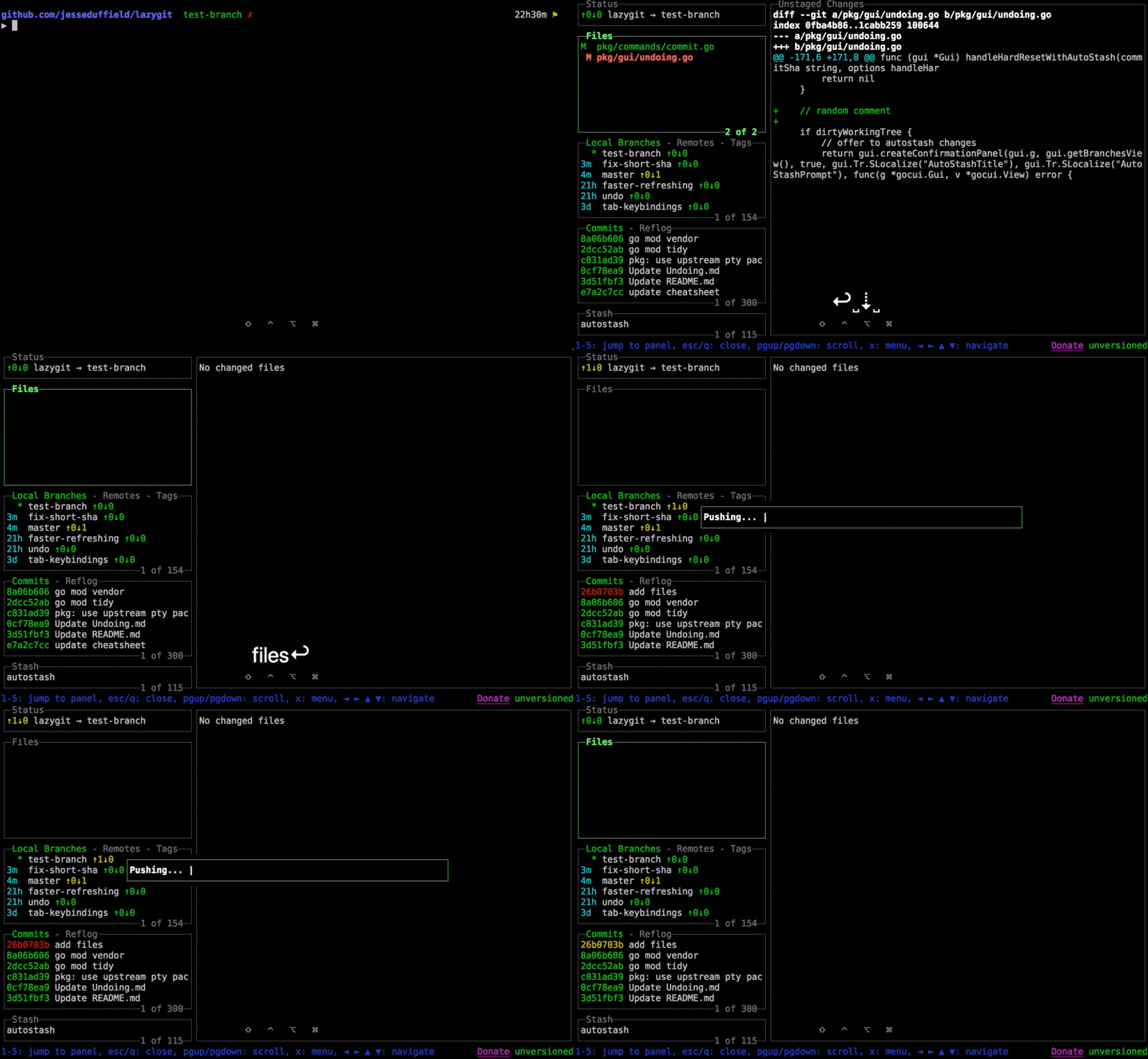
lazygit - stage hunks, interactive rebase, and conflict resolution via keyboard
71.8K GitHub stars. The de facto standard for terminal git UI. Stage individual lines, interactive rebase, cherry-pick, resolve conflicts - all via keyboard shortcuts instead of memorizing git flags.
# Install
brew install lazygit        # macOS
sudo apt install lazygit    # Ubuntu/Debian
scoop install lazygit       # Windows

# Launch in any git repo
lazygit

# Key bindings:
# Space  = stage/unstage file
# a      = stage all
# c      = commit
# p      = push
# P      = pull
# r      = rebase
# ?      = help
The Modern CLI Toolkit
| Tool | Replaces | Why It's Better | Install |
|---|---|---|---|
| ripgrep (rg) | grep | 10× faster, respects .gitignore, regex by default | brew install ripgrep |
| bat | cat | Syntax highlighting, git integration, line numbers | brew install bat |
| fd | find | Simple syntax, fast, sensible defaults | brew install fd |
| fzf | - | Fuzzy finder for files, history, processes. The glue tool. | brew install fzf |
| delta | git diff | Syntax-highlighted, side-by-side diffs | brew install git-delta |
| eza | ls | Color output, git integration, tree view | brew install eza |
| zoxide | cd | Smart directory jumping, remembers frequent dirs | brew install zoxide |
| starship | PS1/prompt | Cross-shell prompt with git status, language versions | brew install starship |
| atuin | history | Shell history sync across machines, fuzzy search | brew install atuin |
Shell Setup - All Tools Together
# ~/.zshrc (or ~/.bashrc)

# Starship prompt
eval "$(starship init zsh)"

# Zoxide (smart cd)
eval "$(zoxide init zsh)"

# fzf keybindings (Ctrl+R for history, Ctrl+T for files)
source <(fzf --zsh)

# Aliases using modern tools
alias ls="eza --icons --group-directories-first"
alias ll="eza -la --icons --git"
alias tree="eza --tree --level=3"
alias cat="bat --paging=never"
alias grep="rg"
alias find="fd"
alias diff="delta"

# Git aliases
alias lg="lazygit"
alias gs="git status -sb"
alias gd="git diff | delta"
alias gl="git log --oneline --graph --decorate -20"

# fzf + ripgrep for interactive code search
fif() {
  rg --files-with-matches --no-messages "$1" | \
    fzf --preview "bat --color=always {} | rg --color=always '$1'"
}
AI-Powered CLIs
| CLI | What It Does | Price |
|---|---|---|
| Claude Code | Terminal-native agentic coding. Reads codebases, edits files, runs tests, creates PRs. | $20-200/mo |
| GitHub Copilot CLI | Full agentic terminal tool. Fleet mode for parallel agents. GA April 2026. | Included with Copilot sub |
| Kiro CLI | Spec-driven agentic chat. AWS integration. MCP support. | Free / $19/mo |
| Aider | Open-source CLI agent. Git-first. Works with 75+ LLM providers. | Free (API costs only) |
Putting It All Together
A Modern Developer Workflow (2026)
# Morning: Check what Copilot did overnight
gh pr list --author @copilot
gh pr view 87 --comments

# Review and merge the agent's PR
gh pr checkout 87
npm test
gh pr merge 87 --squash

# Start a new feature - use Claude Code for complex work
claude "Implement WebSocket support for real-time notifications.
       Use Redis pub/sub for horizontal scaling.
       Include reconnection logic and heartbeat."

# Quick git operations with lazygit
lg  # stage, commit, push interactively

# Search codebase with ripgrep
rg "TODO|FIXME|HACK" --type ts

# Deploy via GitHub Actions
git push origin main  # CI/CD handles the rest

# Monitor deployment
gh run watch
Recommended Stack by Team Size
| Team Size | Repo | IDE | AI Agent | CLI | Monthly Cost/Dev |
|---|---|---|---|---|---|
| Solo | GitHub Free | Cursor or VS Code | Copilot Pro ($10) | gh + lazygit | $10-30 |
| Startup (5-20) | GitHub Team | Cursor Pro | Copilot Business ($19) | gh + Claude Code | $40-60 |
| Enterprise (100+) | GitLab Ultimate | JetBrains + AI | Copilot Enterprise + Augment | glab + Kiro CLI | $80-150 |
| Open Source | GitHub Free | VS Code or Zed | Aider + OpenHands | gh + lazygit | $0-30 (API) |
Key Takeaways
- The agent shift is real: 85-90% of developers use AI coding tools in 2026. The question isn't whether to adopt, but which tools fit your workflow.
- Terminal is back: Claude Code and Copilot CLI prove you don't need an IDE for AI-assisted development.
- Open source is competitive: Aider, OpenHands, Cline, and Continue.dev offer compelling free alternatives to commercial tools.
- MCP is the standard: Model Context Protocol has become the universal integration layer across all major tools.
- BYOM is expected: Vendor lock-in to a single AI model is increasingly rejected. Most tools support multiple providers.