Codex Custom Skills - Build Reusable AI Agent Capabilities
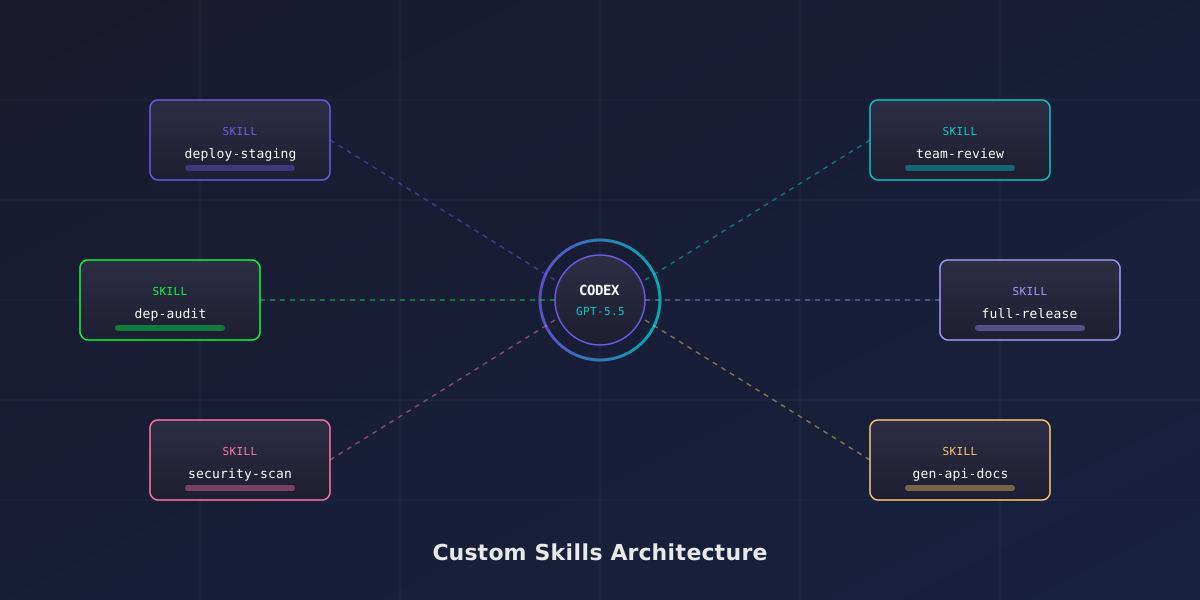
OpenAI Codex with GPT-5.5 is already a powerful coding agent out of the box. But the real unlock comes when you teach it your workflows. Custom skills let you package repeatable procedures - deployment scripts, code review checklists, migration patterns, security audits - into reusable, shareable agent capabilities that any team member can invoke by name.
This guide covers everything you need to build, test, deploy, and share custom skills for Codex. Whether you are using the Codex CLI locally or the cloud-based Codex web agent, skills work identically. By the end, you will have a complete understanding of the skill manifest format, tool permissions, testing workflows, team sharing via registries, and advanced composition patterns that chain multiple skills together.
1. What Are Custom Skills?
A custom skill is a declarative definition of an agent capability. It tells Codex exactly what to do, what tools it can use, what inputs it expects, and what outputs it should produce. Skills are the difference between telling Codex "deploy this to staging" every time with a paragraph of context, and simply invoking @deploy-staging and having it execute your exact deployment procedure.
Skills were introduced in the Codex March 2026 platform update alongside the GPT-5.5 model upgrade. They build on the AGENTS.md convention but go further - where AGENTS.md provides passive context, skills are active, executable procedures with defined interfaces.
Core Concepts
- Manifest: A YAML or JSON file in
.codex/skills/that defines the skill's name, description, inputs, tools, and instructions - Invocation: Skills are triggered by name - either via
@skill-namein the Codex chat,codex --skill skill-namein the CLI, or programmatically via the API - Scope: Skills can be project-local (in your repo), organization-wide (in a shared registry), or public (on the OpenAI Skill Marketplace)
- Isolation: Each skill execution runs in its own sandbox context with only the permissions declared in its manifest
What Skills Can Do
Skills are not limited to code generation. They can orchestrate complex multi-step workflows:
- Run security scans and generate compliance reports
- Execute database migrations with rollback verification
- Perform code reviews against team-specific standards
- Generate API documentation from source code
- Create and configure infrastructure resources
- Run performance benchmarks and compare against baselines
- Triage incoming issues and assign priority labels
- Generate release notes from commit history
2. Skills vs AGENTS.md - When to Use Each
AGENTS.md and custom skills serve different purposes, and understanding when to use each prevents duplication and confusion. AGENTS.md is passive context that Codex reads before every task. Skills are active procedures that Codex executes on demand.
| Aspect | AGENTS.md | Custom Skills |
|---|---|---|
| Purpose | Project conventions and context | Executable procedures |
| Activation | Automatic (read on every task) | On-demand (invoked by name) |
| Inputs | None - static document | Typed parameters with defaults |
| Outputs | None - influences behavior | Defined deliverables (files, PRs, reports) |
| Tool access | N/A | Declared per-skill permissions |
| Sharing | Per-repository only | Registry, marketplace, or Git |
| Versioning | Implicit (Git history) | Explicit semver in manifest |
| Best for | Coding style, naming, architecture decisions | Deployments, migrations, audits, reviews |
Use AGENTS.md When
- You want Codex to follow coding conventions on every task without being asked
- You need to document architecture decisions that affect all code generation
- You want to specify testing requirements, linting rules, or commit message formats
Use Custom Skills When
- You have a repeatable procedure with specific steps that must execute in order
- The workflow requires specific tool access (shell, HTTP, browser)
- You want typed inputs so different team members can invoke it with different parameters
- The procedure should produce a specific, verifiable output
@add-feature tells Codex "when adding a feature, create the implementation file, write tests, update the changelog, and open a PR with this specific template."
3. The Skill Manifest Format
Every custom skill is defined by a manifest file stored in your repository at .codex/skills/skill-name.yaml. The manifest is a declarative specification that tells Codex everything it needs to execute the skill. GPT-5.5's improved instruction-following means manifests are interpreted with high fidelity - the agent does exactly what you specify.
Manifest Structure
# .codex/skills/deploy-staging.yaml
name: deploy-staging
version: 1.2.0
description: Deploy the current branch to the staging environment with smoke tests
author: platform-team

inputs:
  branch:
    type: string
    default: current
    description: Branch to deploy (defaults to current working branch)
  skip_tests:
    type: boolean
    default: false
    description: Skip smoke tests after deployment
  region:
    type: enum
    values: [us-east-1, us-west-2, eu-west-1]
    default: us-east-1
    description: AWS region for staging deployment

tools:
  - shell
  - file_read
  - file_write
  - http

constraints:
  timeout: 300s
  max_retries: 2
  sandbox_mode: workspace-write
  network_access: true

instructions: |
  Execute the staging deployment procedure:

  1. Verify the branch exists and has no uncommitted changes
  2. Run the build: `npm run build:staging`
  3. Execute database migrations: `npm run migrate:staging -- --region {{region}}`
  4. Deploy via CDK: `npx cdk deploy StagingStack --require-approval never --context region={{region}}`
  5. Wait 30 seconds for services to stabilize
  6. Unless skip_tests is true, run smoke tests: `npm run test:smoke -- --env staging --region {{region}}`
  7. If smoke tests fail, run rollback: `npx cdk deploy StagingStack --context version=previous`
  8. Report deployment status with the CloudFormation stack outputs

outputs:
  - deployment_url: The staging environment URL
  - stack_outputs: Key CloudFormation outputs
  - test_results: Smoke test pass/fail summary
Manifest Fields Reference
| Field | Required | Description |
|---|---|---|
name | Yes | Unique identifier used for invocation. Lowercase, hyphens only. |
version | Yes | Semver version string. Registries use this for updates. |
description | Yes | One-line summary shown in skill listings and help output. |
author | No | Team or individual who maintains this skill. |
inputs | No | Typed parameters with defaults. Supports string, boolean, number, enum, array. |
tools | Yes | List of sandbox tools the skill requires. Codex grants only these. |
constraints | No | Execution limits: timeout, retries, sandbox mode, network access. |
instructions | Yes | Step-by-step procedure. Supports {{input}} template variables. |
outputs | No | Expected deliverables. Helps Codex know when the skill is complete. |
dependencies | No | Other skills this skill invokes (for composition). |
triggers | No | Automatic invocation rules (on PR, on push, on schedule). |
4. Building Your First Custom Skill
Let us build a practical skill from scratch - a code review skill that enforces your team's specific standards. This is one of the most common first skills teams create because it immediately reduces review cycle time and catches issues that generic linters miss.
Step 1 - Create the Skills Directory
mkdir -p .codex/skills
touch .codex/skills/team-review.yaml
Step 2 - Define the Manifest
# .codex/skills/team-review.yaml
name: team-review
version: 1.0.0
description: Review code changes against team standards and produce actionable feedback

inputs:
  scope:
    type: enum
    values: [changed-files, full-module, specific-file]
    default: changed-files
    description: What to review
  file_path:
    type: string
    default: ""
    description: Specific file to review (only used when scope is specific-file)
  severity:
    type: enum
    values: [strict, normal, lenient]
    default: normal
    description: How strictly to enforce standards

tools:
  - file_read
  - shell

constraints:
  timeout: 120s
  sandbox_mode: read-only
  network_access: false

instructions: |
  Perform a code review following these team standards:

  ## Review Checklist
  1. **Error handling**: Every async function must have try/catch or .catch(). No unhandled promise rejections.
  2. **Type safety**: No `any` types in TypeScript. All function parameters and returns must be typed.
  3. **Naming**: Variables use camelCase, constants use UPPER_SNAKE_CASE, types use PascalCase.
  4. **Testing**: Every new function must have a corresponding test. Check for edge cases.
  5. **Security**: No hardcoded secrets, no SQL string concatenation, no innerHTML with user input.
  6. **Performance**: Flag N+1 queries, unnecessary re-renders, missing pagination on list endpoints.
  7. **Documentation**: Public functions need JSDoc. Complex logic needs inline comments.

  ## Severity Levels
  - strict: Flag everything, including style nitpicks
  - normal: Flag bugs, security issues, and missing tests. Suggest style improvements.
  - lenient: Only flag bugs and security issues

  ## Process
  1. Identify files to review based on {{scope}}
  2. Read each file and analyze against the checklist
  3. For each issue found, provide:
     - File and line number
     - Severity (critical/warning/suggestion)
     - What is wrong
     - How to fix it (with code example)
  4. Summarize: total issues by severity, overall assessment, estimated fix time

outputs:
  - review_report: Structured review with issues grouped by file
  - summary: One-paragraph overall assessment
  - fix_estimate: Estimated time to address all issues
Step 3 - Invoke the Skill
Once the manifest is committed to your repository, invoke it in three ways:
# Codex CLI - invoke with defaults
codex --skill team-review

# Codex CLI - with parameters
codex --skill team-review --input scope=specific-file --input file_path=src/auth/login.ts --input severity=strict

# In Codex web chat
@team-review scope=changed-files severity=normal
Step 4 - Iterate on the Instructions
The first version of any skill will need refinement. Common improvements after initial testing:
- Add examples of good vs bad code for ambiguous rules
- Specify which files or directories to exclude (generated code, vendor, etc.)
- Tune the output format - some teams prefer inline comments, others prefer a summary report
- Add context about your tech stack so Codex understands framework-specific patterns
5. Tool Permissions and Sandboxing
Every skill declares exactly which tools it needs. Codex enforces these declarations at runtime - a skill that only declares file_read cannot write files or execute shell commands, even if its instructions attempt to. This is the principle of least privilege applied to AI agents.
Available Tools
| Tool | Capability | Risk Level |
|---|---|---|
file_read | Read any file in the repository | Low |
file_write | Create or modify files | Medium |
shell | Execute shell commands in sandbox | High |
http | Make outbound HTTP requests | Medium |
browser | Automated browser interactions | High |
git | Git operations (commit, branch, push) | Medium |
package_manager | Install/update dependencies | Medium |
database | Execute database queries (requires connection config) | High |
Sandbox Modes
The sandbox_mode constraint controls the overall execution environment:
- read-only: Skill can read files and run non-destructive commands. Cannot modify the filesystem. Ideal for review and analysis skills.
- workspace-write: Skill can read and write files within the repository. Cannot execute arbitrary shell commands outside of declared tools. The default for most skills.
- full-access: Unrestricted execution within the sandbox. Required for deployment skills that need to run build tools, package managers, and infrastructure commands. Use with caution.
# Read-only analysis skill
constraints:
  sandbox_mode: read-only
  network_access: false
  timeout: 60s

# Deployment skill with full access
constraints:
  sandbox_mode: full-access
  network_access: true
  timeout: 300s
  max_retries: 1
Network Access Control
Skills that need to call external APIs, download packages, or interact with cloud services must declare network_access: true. You can further restrict network access to specific domains:
constraints:
  network_access: true
  allowed_domains:
    - api.github.com
    - registry.npmjs.org
- *.amazonaws.comshell + network_access: true + full-access sandbox mode have maximum capability. Only grant this combination to deployment and infrastructure skills maintained by your platform team. Review these skills carefully before approving them in your organization's registry.
6. Testing and Debugging Skills
Skills are code - they need testing. Codex provides a dedicated testing workflow that lets you validate skill behavior before sharing with your team. The codex skill test command runs your skill in a dry-run sandbox and reports what it would do without making actual changes.
Dry Run Mode
# Test a skill without executing side effects
codex skill test team-review --input scope=changed-files

# Test with verbose output showing each step
codex skill test deploy-staging --input region=us-west-2 --verbose

# Test against a specific commit or branch
codex skill test team-review --ref feature/auth-refactor
Skill Validation
Before a skill can be published to a registry, it must pass validation:
# Validate manifest syntax and completeness
codex skill validate .codex/skills/deploy-staging.yaml

# Output:
# ✓ name: valid identifier
# ✓ version: valid semver
# ✓ inputs: all types valid, defaults match types
# ✓ tools: all recognized tool names
# ✓ constraints: valid sandbox_mode
# ✓ instructions: template variables match input names
# ✓ Ready to publish
Debugging Failed Executions
When a skill fails, Codex provides a detailed execution trace:
# View the last skill execution log
codex skill logs deploy-staging --last

# Output includes:
# - Each instruction step attempted
# - Tool calls made (with arguments)
# - Stdout/stderr from shell commands
# - Where execution failed and why
# - Suggested fixes based on the error
Writing Skill Tests
For critical skills, write formal test cases that run in CI:
# .codex/skills/tests/team-review.test.yaml
skill: team-review
tests:
  - name: catches-unhandled-promise
    setup:
      files:
        src/bad.ts: |
          async function fetchData() {
            const res = await fetch('/api/data');
            return res.json();
          }
    input:
      scope: specific-file
      file_path: src/bad.ts
      severity: strict
    expect:
      contains: "unhandled promise"
      severity_counts:
        critical: 1

  - name: passes-clean-code
    setup:
      files:
        src/good.ts: |
          async function fetchData(): Promise<Data> {
            try {
              const res = await fetch('/api/data');
              return await res.json();
            } catch (error) {
              throw new AppError('Failed to fetch data', { cause: error });
            }
          }
    input:
      scope: specific-file
      file_path: src/good.ts
      severity: strict
    expect:
      severity_counts:
        critical: 0
        warning: 0
# Run skill tests
codex skill test --suite .codex/skills/tests/
# Run in CI (GitHub Actions example)
- name: Test Codex Skills
run: npx @openai/codex-cli skill test --suite .codex/skills/tests/ --ci7. Sharing Skills Across Teams
Skills become exponentially more valuable when shared. A deployment skill built by your platform team can be used by every developer without them needing to understand the underlying infrastructure. Codex supports three distribution mechanisms.
Organization Registry
The most common approach for enterprise teams. Your organization maintains a private registry of approved skills:
# Publish a skill to your org registry
codex skill publish .codex/skills/deploy-staging.yaml --registry org

# List available org skills
codex skill list --registry org

# Install an org skill into your project
codex skill install deploy-staging --registry org

# This adds to .codex/skills.lock:
# deploy-staging:
#   version: 1.2.0
#   registry: org
#   sha256: a1b2c3d4...
Git-Based Sharing
For teams that prefer Git as the source of truth, skills can be referenced from external repositories:
# .codex/skills.yaml - reference external skills
imports:
  - name: security-scan
    source: git@github.com:your-org/codex-skills.git
    path: skills/security-scan.yaml
    version: ">=2.0.0"

  - name: release-notes
    source: git@github.com:your-org/codex-skills.git
    path: skills/release-notes.yaml
    version: "1.5.x"
OpenAI Skill Marketplace
Public skills are available on the OpenAI Skill Marketplace - a curated directory of community-contributed skills. These cover common workflows that are not team-specific:
# Browse marketplace skills
codex skill search "database migration"

# Install a marketplace skill
codex skill install @openai/db-migrate --registry marketplace

# Marketplace skills are versioned and reviewed
# They cannot access network or shell by default - you must explicitly grant permissionsshell or network_access. Most organizations require a security review before these skills can be added to the org registry. Codex supports a requires_approval field in the manifest for this purpose.
Skill Versioning and Updates
Skills follow semver. When a skill is updated in the registry:
- Patch updates (1.2.0 to 1.2.1): Bug fixes, instruction clarifications. Auto-applied.
- Minor updates (1.2.0 to 1.3.0): New optional inputs, expanded capabilities. Auto-applied if your version constraint allows.
- Major updates (1.x to 2.0.0): Breaking changes to inputs, outputs, or behavior. Requires manual update and testing.
8. Advanced Patterns - Chaining and Composition
Individual skills are useful. Composed skills are transformative. Codex supports skill chaining - where one skill invokes another - and parallel composition - where multiple skills run simultaneously on different aspects of a task.
Sequential Chaining
A skill can declare dependencies on other skills and invoke them as steps:
# .codex/skills/full-release.yaml
name: full-release
version: 1.0.0
description: Complete release workflow - test, build, deploy, notify

dependencies:
  - team-review
  - deploy-staging
  - generate-changelog

inputs:
  version_bump:
    type: enum
    values: [patch, minor, major]
    default: patch

tools:
  - shell
  - file_write
  - git
  - http

instructions: |
  Execute the full release workflow:

  1. Invoke @team-review with scope=changed-files, severity=strict
     - If any critical issues found, STOP and report them
  2. Bump version in package.json according to {{version_bump}}
  3. Invoke @generate-changelog for the new version
  4. Commit version bump and changelog: "chore: release v{new_version}"
  5. Create git tag: v{new_version}
  6. Invoke @deploy-staging with the current branch
     - If deployment fails, revert the version bump commit and STOP
  7. Push the tag and commit to origin
  8. POST to Slack webhook with release summary
Parallel Composition
For independent tasks, skills can run in parallel to reduce total execution time:
# .codex/skills/pr-checks.yaml
name: pr-checks
version: 1.0.0
description: Run all PR quality checks in parallel

parallel:
  - skill: team-review
    input:
      scope: changed-files
      severity: normal
  - skill: security-scan
    input:
      target: changed-files
  - skill: performance-check
    input:
      baseline: main

join:
  strategy: all-must-pass
  on_failure: report-all-then-fail

instructions: |
  After all parallel skills complete:
  1. Combine results into a single PR comment
  2. Set the overall status check to pass/fail based on join strategy
  3. If any skill found critical issues, request changes on the PR
Conditional Execution
Skills can include conditional logic based on inputs or runtime context:
instructions: |
  1. Detect the project language from package.json/Cargo.toml/go.mod
  2. Based on language:
     - If TypeScript: run `npm run lint && npm test`
     - If Rust: run `cargo clippy && cargo test`
     - If Go: run `golangci-lint run && go test ./...`
     - If Python: run `ruff check . && pytest`
  3. If {{notify}} is true, post results to the team channel
Skill Inheritance
Create base skills that other skills extend:
# .codex/skills/base-deploy.yaml
name: base-deploy
version: 1.0.0
abstract: true  # Cannot be invoked directly

inputs:
  environment:
    type: string
  region:
    type: string

tools:
  - shell
  - http

instructions: |
  1. Verify AWS credentials are configured
  2. Run preflight checks for {{environment}}
  3. [OVERRIDE: deployment_steps]
  4. Run health checks against the deployed service
  5. Report status
# .codex/skills/deploy-production.yaml
name: deploy-production
version: 1.0.0
extends: base-deploy
inputs:
environment:
default: production
region:
default: us-east-1
require_approval:
type: boolean
default: true
override:
deployment_steps: |
- If require_approval, pause and wait for manual approval via Slack
- Run blue/green deployment: `./scripts/deploy-bg.sh {{environment}} {{region}}`
- Shift 10% traffic to new version
- Monitor error rates for 5 minutes
- If error rate > 0.1%, rollback immediately
- Otherwise, shift remaining traffic9. Production Examples
Here are five real-world skills that teams are using in production today. Each demonstrates a different pattern and complexity level.
Example 1 - API Documentation Generator
# .codex/skills/generate-api-docs.yaml
name: generate-api-docs
version: 2.1.0
description: Generate OpenAPI spec and markdown docs from source code

inputs:
  format:
    type: enum
    values: [openapi-3.1, markdown, both]
    default: both
  output_dir:
    type: string
    default: docs/api

tools:
  - file_read
  - file_write
  - shell

constraints:
  timeout: 180s
  sandbox_mode: workspace-write

instructions: |
  1. Scan src/routes/ and src/controllers/ for all HTTP endpoint definitions
  2. For each endpoint, extract: method, path, request body schema, response schema, auth requirements, rate limits
  3. Read existing JSDoc/TSDoc comments for descriptions
  4. Generate OpenAPI 3.1 spec at {{output_dir}}/openapi.yaml
  5. Generate markdown documentation at {{output_dir}}/README.md with:
     - Endpoint table (method, path, description, auth)
     - Detailed sections per endpoint with request/response examples
     - Error code reference
  6. Validate the OpenAPI spec: `npx @redocly/cli lint {{output_dir}}/openapi.yaml`
  7. If validation fails, fix the spec and re-validate
Example 2 - Database Migration Safety Check
# .codex/skills/migration-check.yaml
name: migration-check
version: 1.0.0
description: Analyze database migrations for safety issues before applying

inputs:
  migration_dir:
    type: string
    default: migrations/
  database_type:
    type: enum
    values: [postgres, mysql, sqlite]
    default: postgres

tools:
  - file_read

constraints:
  sandbox_mode: read-only
  timeout: 60s

instructions: |
  Analyze all pending migration files in {{migration_dir}} for these risks:

  ## Critical (block deployment)
  - DROP TABLE or DROP COLUMN without a preceding data migration
  - ALTER TABLE on tables with >1M rows without CONCURRENTLY (Postgres)
  - NOT NULL constraint added without DEFAULT on existing columns
  - Unique index creation that could fail on existing duplicate data

  ## Warning (flag for review)
  - Migrations that cannot be rolled back (no down migration)
  - Schema changes that break backward compatibility with the current app version
  - Index creation on large tables (estimate lock time)
  - Foreign key additions that require full table scans

  ## Output
  For each issue:
  - File name and line number
  - Risk level (critical/warning)
  - What could go wrong in production
  - Recommended safe alternative (e.g., multi-step migration pattern)
Example 3 - Incident Response Runbook
# .codex/skills/incident-triage.yaml
name: incident-triage
version: 1.3.0
description: Automated first-response for production incidents

inputs:
  service:
    type: string
    description: Affected service name
  symptoms:
    type: string
    description: Observed symptoms (error messages, metrics)
  severity:
    type: enum
    values: [sev1, sev2, sev3]
    default: sev2

tools:
  - shell
  - http
  - file_read

constraints:
  timeout: 120s
  network_access: true
  allowed_domains:
    - "*.amazonaws.com"
    - api.pagerduty.com
    - hooks.slack.com

instructions: |
  Execute incident triage for {{service}}:

  1. Check service health: `aws ecs describe-services --cluster prod --services {{service}}`
  2. Pull recent logs: `aws logs filter-log-events --log-group /ecs/{{service}} --start-time $(date -d '15 min ago' +%s000) --filter-pattern ERROR`
  3. Check recent deployments: `aws ecs describe-task-definition --task-definition {{service}} --query 'taskDefinition.revision'`
  4. Analyze symptoms against known patterns:
     - High error rate + recent deploy = likely bad deploy, recommend rollback
     - High latency + normal error rate = likely downstream dependency
     - OOM kills = memory leak or traffic spike
  5. Generate incident report with:
     - Timeline of events
     - Root cause hypothesis
     - Recommended immediate action
     - Rollback command if applicable
  6. If severity is sev1, POST to Slack #incidents channel with the report
Example 4 - Dependency Audit and Update
# .codex/skills/dep-audit.yaml
name: dep-audit
version: 1.0.0
description: Audit dependencies for vulnerabilities and outdated packages

tools:
  - shell
  - file_read
  - file_write
  - git

constraints:
  sandbox_mode: workspace-write
  network_access: true
  timeout: 240s

instructions: |
  1. Run security audit: `npm audit --json > /tmp/audit.json`
  2. Parse results and categorize by severity (critical, high, moderate, low)
  3. For each critical/high vulnerability:
     - Check if a patched version exists
     - Verify the patch does not introduce breaking changes (check changelog)
     - If safe, update the dependency
  4. Run `npm outdated --json` to find stale dependencies
  5. For major version bumps, check migration guides and flag breaking changes
  6. Run the test suite after all updates: `npm test`
  7. If tests pass, create a branch and commit: "chore: security patches and dependency updates"
  8. Generate a summary table: package, old version, new version, reason for update
Example 5 - Feature Flag Cleanup
# .codex/skills/flag-cleanup.yaml
name: flag-cleanup
version: 1.0.0
description: Find and remove stale feature flags from the codebase

inputs:
  flag_name:
    type: string
    description: The feature flag to remove
  winning_variant:
    type: enum
    values: [enabled, disabled]
    default: enabled
    description: Which variant won (determines which code path to keep)

tools:
  - file_read
  - file_write
  - shell

instructions: |
  Remove the feature flag "{{flag_name}}" from the codebase:

  1. Search all source files for references to {{flag_name}}
  2. For each reference:
     - If it is a conditional (if/else, ternary), keep the {{winning_variant}} branch and remove the other
     - If it is a flag definition/registration, remove it entirely
     - If it is a test that tests both variants, keep only the {{winning_variant}} test
  3. Remove the flag from configuration files (flags.yaml, .env.example)
  4. Run the linter to fix any formatting issues from removed code
  5. Run tests to verify nothing broke
  6. Report: files modified, lines removed, any manual review needed
10. Frequently Asked Questions
Can skills call external APIs with secrets?
Yes. Skills that need API keys or tokens reference them through Codex's secrets manager. You configure secrets at the organization level (codex secrets set SLACK_WEBHOOK https://hooks.slack.com/...), and skills reference them as {{secrets.SLACK_WEBHOOK}}. Secrets are injected at runtime and never appear in logs or outputs.
What happens if a skill exceeds its timeout?
Codex terminates the skill execution and reports a timeout error with the last completed step. If max_retries is set, it will retry from the beginning. For long-running skills, increase the timeout or break the skill into smaller composed skills that checkpoint progress.
Can I use skills with the Codex API for programmatic access?
Yes. The Codex API accepts a skill parameter:
import openai

response = openai.codex.tasks.create(
    repository="your-org/your-repo",
    skill="deploy-staging",
    inputs={"region": "us-west-2", "skip_tests": False},
    wait=True
)
print(response.outputs)
How do skills interact with AGENTS.md?
Codex reads AGENTS.md before executing any skill. This means your project conventions apply to skill execution automatically. If AGENTS.md says "use pytest for all tests," a skill that generates tests will use pytest without needing to specify it in the skill instructions. Skills can override AGENTS.md conventions by being more specific in their instructions.
Are there limits on skill complexity?
The instruction field has a 10,000 token limit. For extremely complex workflows, break them into composed skills. There is no limit on the number of skills per repository or the depth of skill chaining, but deeply nested chains (5+ levels) can be hard to debug. Keep composition shallow and explicit.
Can skills modify files outside the repository?
No. The sandbox restricts all file operations to the repository root. Skills cannot access the host filesystem, other repositories, or system directories. This is a hard security boundary that cannot be overridden even with full-access sandbox mode.