The ICQ Era: Flooders, Spoofing & the Golden Age of IM Hacking
Before WhatsApp, before Discord, before Slack - there was a little green flower on your Windows taskbar and a sound that defined a generation: "Uh oh!" If you heard it, you knew. Someone was reaching out across the early internet to talk to you. That program was ICQ, and it didn't just pioneer instant messaging - it spawned an entire underground culture of hackers, spoofers, flooders, and digital pranksters that shaped internet security for decades to come.
This is the story of the golden age of instant messaging - when your IP address was public knowledge, when a 5-digit UIN made you royalty, when "flooding" someone's client was considered a legitimate power move, and when every teenager with a dial-up connection was one downloaded tool away from becoming a hacker. Grab your 56k modem. We're going back.
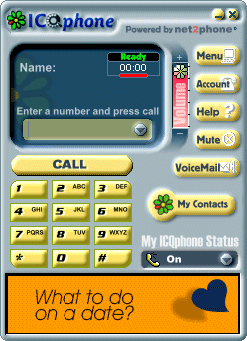
ICQ Phone interface - actual screenshot from ICQ's official product tour (archived 2000)
ICQ: "I Seek You"
In November 1996, four young Israeli developers - Yair Goldfinger, Arik Vardi, Sefi Vigiser, and Amnon Amir - released a small Windows application through their company Mirabilis. They called it ICQ, a phonetic play on "I Seek You." It was, by any reasonable measure, the first mainstream instant messaging client for the consumer internet.
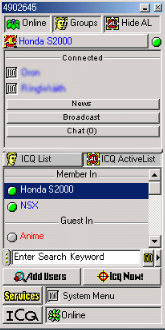
The actual ICQ client - contact list with Online/Groups tabs, ICQ List, ActiveList, member search, and the iconic green flower. UIN 4902545 visible at top.
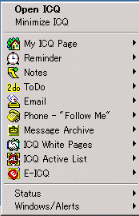
ICQ's system tray menu - My ICQ Page, Reminder, Notes, ToDo, Email, Phone "Follow Me", Message Archive, ICQ White Pages, and the Status options every user knew by heart.
Before ICQ, real-time text communication meant IRC (Internet Relay Chat) - powerful but intimidating, with its slash commands, channel modes, and server splits. ICQ changed everything by making instant messaging personal. You didn't join a channel. You added individual people to your contact list. You saw when they came online. You heard that iconic "uh oh!" sound when a message arrived. It was intimate in a way the internet hadn't been before.
The UIN System
Every ICQ user was assigned a UIN - Universal Internet Number. This wasn't a username you chose; it was a sequential number assigned at registration. The very first users got numbers like 1000, 1001, 1002. By the time ICQ hit mainstream adoption in 1998, new users were getting 8-digit numbers. Your UIN was your identity. You printed it on business cards. You put it in your email signature. You scrawled it on notebook covers in school.
The UIN system created an accidental social hierarchy. A 5-digit UIN (like 12345) meant you were an early adopter - an internet OG. A 6-digit number was respectable. A 7-digit number was normal. An 8-digit number meant you were late to the party. This seemingly trivial detail would spawn an entire underground economy.
The Rise
ICQ's growth was explosive. By 1997, it had 5 million users. By 1998, that number had ballooned to over 20 million. AOL took notice and acquired Mirabilis in June 1998 for a staggering $407 million - an astronomical sum for a company with essentially zero revenue. At its peak, ICQ had over 100 million registered users worldwide.
The acquisition was both a validation and a turning point. AOL already had AIM (AOL Instant Messenger), and the two products would coexist awkwardly for years. But in those early days, ICQ was king - especially outside the United States, where it dominated in Israel, Russia, Germany, Brazil, and across Asia.
The holy trinity of late-90s internet: ICQ, AIM, and GeoCities - Wikimedia Commons (public domain)
The UIN Economy
Digital identity was currency in the ICQ era
The tools of the trade: a PC, a modem, and ambition
What started as a quirk of sequential numbering became a full-blown underground economy. Low-digit UINs were status symbols, and where there's status, there's a market - and where there's a market, there are thieves.
The Value Scale
By the late 1990s, UIN trading was a thriving black market. The pricing was roughly:
| UIN Length | Example | Approximate Value (1999-2002) | Status |
|---|---|---|---|
| 5 digits | 12345 |
$200 - $500+ | 🏆 Elite / OG |
| 6 digits | 123456 |
$50 - $200 | ⭐ Veteran |
| 7 digits (vanity) | 1234567 |
$20 - $100 | 👍 Respectable |
| 7 digits (random) | 8374621 |
$5 - $20 | 😐 Normal |
| 8+ digits | 83746219 |
Worthless | 🆕 Newbie |
"Vanity" numbers - repeating digits like 1111111, sequential numbers like 1234567, or palindromes like 1234321 - commanded premium prices regardless of length. The holy grail was a low 5-digit number with a memorable pattern.
UIN Theft Techniques
Where there's value, there are thieves. UIN theft became an art form:
- Password Guessing: Early ICQ had no lockout mechanism. Attackers could brute-force passwords indefinitely. Most users chose terrible passwords - their name, "password," "123456," or their own UIN as the password.
- Social Engineering ICQ Support: Contacting Mirabilis/AOL support and claiming to be the original owner of a UIN. "I forgot my password and my email changed" was often enough. Support staff had no robust verification process.
- Email Takeover: Compromising the email address associated with a UIN, then using password recovery to reset the ICQ password. This was especially effective because many users registered with free email services (Hotmail, Yahoo) that had their own security weaknesses.
- Primary Email Exploit: ICQ stored the "primary email" in the user's profile, which was visible to anyone. Attackers could see exactly which email to target for password recovery.
- Database Leaks: As ICQ's user database grew, portions of it were leaked or scraped. Password hashes (when they existed) were often trivially crackable.
Stolen UINs were traded on IRC channels (#icq-trade was legendary), on web forums, and eventually on early auction sites. The entire ecosystem operated in a gray area - technically illegal, but enforcement was essentially nonexistent. It was the Wild West, and your 5-digit UIN was a horse worth stealing.
ICQ image asset - recovered from icq.com via the Wayback Machine (2002)
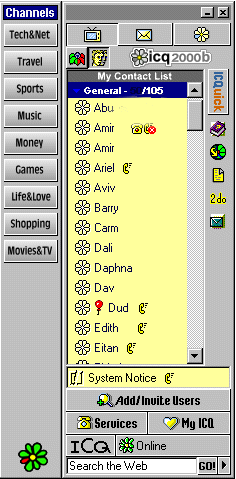
ICQ Channels - the actual interface (archived 2000)
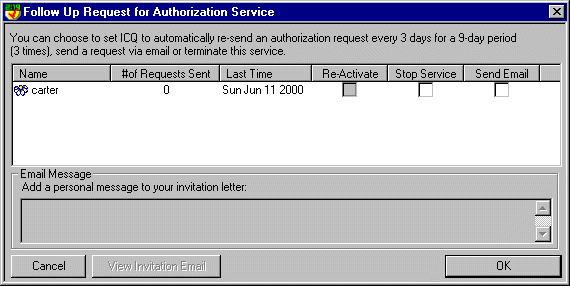
ICQ Authorization dialog (archived 2000)
🖥️ Real ICQ-Era Remote Access Tool
RATs (Remote Administration Tools) were distributed alongside ICQ exploits - letting attackers control a target's PC over the internet:
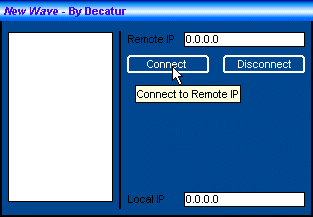
New Wave RAT - connection panel (2001)
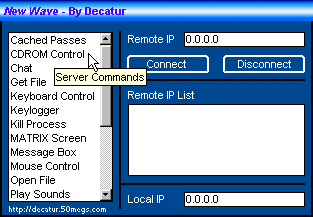
New Wave RAT - admin panel (2001)
A real VB6 Remote Administration Tool from 2001 - distributed on free web hosts alongside ICQ exploits and Yahoo booters
ICQ Exploits & Tools
ICQ wasn't just a messaging client - it was a playground. Its peer-to-peer architecture, minimal security, and massive user base made it the single most targeted application of the late 1990s. An entire cottage industry of hacking tools emerged, most of them built by teenagers who were teaching themselves programming by breaking things.

IP Revealers
ICQ's original architecture was peer-to-peer. When you sent a message, your client connected directly to the recipient's client. This meant that anyone on your contact list - or anyone who could send you a message - could trivially discover your IP address. Dedicated tools automated this: enter a UIN, get an IP. It was that simple.
IP revealers were the gateway drug of ICQ hacking. They were easy to use, required no technical knowledge, and the information they revealed was genuinely dangerous in an era when most home users had no firewall, no NAT router, and a static (or semi-static) IP address from their ISP. Knowing someone's IP in 1999 was like knowing their home address today.
ICQ Flooders
Flooders were the blunt instrument of ICQ warfare. They worked by sending hundreds or thousands of messages to a target UIN in rapid succession. The victim's ICQ client would attempt to display each message, spawning notification after notification, playing the "uh oh!" sound in an endless loop, and eventually consuming so much memory that the client - and often the entire computer - would freeze or crash.
The experience of being flooded was visceral. Your screen would fill with message windows. The "uh oh!" sound would stutter and overlap into a cacophony. Your mouse would stop responding. Your 64MB of RAM would be consumed in seconds. The only escape was Ctrl+Alt+Delete - if Windows 98 would even respond to it. Many victims had to hard-reset their computers by holding the power button.
ICQ Bombers
While flooders relied on volume, bombers relied on size. They sent specially crafted oversized messages that exploited buffer overflow vulnerabilities in the ICQ client. A single bomber message could crash the target's client instantly - no flood of notifications, just an immediate crash. Some variants could even cause a Blue Screen of Death on Windows 9x systems.
Spoofing Tools
Spoofing tools were the most socially destructive weapons in the ICQ arsenal. They allowed an attacker to send messages that appeared to come from any UIN - not just their own. The recipient would see a message from their friend, their crush, their boss - but it was actually from the attacker.
The implications were devastating. Spoofed messages were used to start fights between friends, break up relationships, spread misinformation, and conduct social engineering attacks. Because ICQ had no message authentication, there was no way to verify that a message actually came from the claimed sender. Trust in ICQ messages was fundamentally broken, but most users never knew it.
ICQ Sniffers & Other Exploits
On shared networks - university dorms, internet cafes, early corporate LANs - ICQ sniffers could intercept messages in transit. Because ICQ transmitted messages in plaintext (no encryption whatsoever), anyone on the same network segment could read every message. University IT departments were horrified when they realized how much sensitive communication was flowing through ICQ completely unencrypted.
Away message exploits were particularly creative. ICQ allowed HTML in away messages, and some versions executed JavaScript. Attackers crafted away messages containing malicious scripts that would execute when someone viewed the away message - an early form of stored XSS (Cross-Site Scripting) years before the term was coined.
File transfer exploits targeted buffer overflows in ICQ's file transfer implementation. Specially crafted filenames or file metadata could crash the client or, in some cases, achieve remote code execution. The file transfer feature was essentially a direct TCP connection between two computers with minimal input validation - a security auditor's nightmare.
The ICQ Hacking Tool Hall of Fame
| Tool | Category | What It Did | Era |
|---|---|---|---|
| ICQ IP Sniffer | IP Revealer | Revealed the IP address of any online UIN via direct connection probing | 1997-2001 |
| ICQ Flood 99 | Flooder | Mass-sent messages to crash the target's client; adjustable speed and volume | 1998-2000 |
| ICQ War 2000 | Multi-tool | Combined flooder, bomber, IP revealer, and spoofer in one GUI | 1999-2001 |
| ICQ Sniff | Sniffer | Captured plaintext ICQ messages on local network segments | 1998-2002 |
| ICQ Spoofer | Spoofer | Sent messages appearing to originate from any UIN | 1998-2001 |
| YSM (You Sick Me) | Alt Client | Open-source console ICQ client with built-in security tools and anti-flood | 2000-2004 |
| ICQ Bomber Pro | Bomber | Sent oversized/malformed messages to crash the target client instantly | 1999-2001 |
| Licq | Alt Client | Linux ICQ client with enhanced privacy features and IP masking | 1999-2005 |
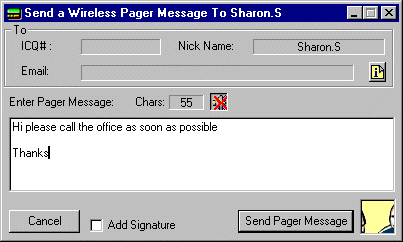
ICQ Wireless feature (archived 2000)
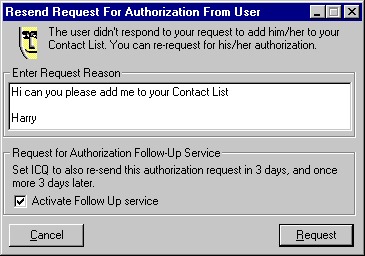
ICQ Authorization settings (archived 2000)
The IP Address Problem

If there was a single architectural decision that defined ICQ's security story, it was peer-to-peer messaging. In ICQ's original design, messages traveled directly from sender to recipient - no server in the middle. This was elegant from an engineering perspective (it reduced server load dramatically) but catastrophic from a security perspective.
What Your IP Revealed
In the late 1990s, knowing someone's IP address was far more dangerous than it is today. Here's why:
- No NAT: Most home users connected directly to the internet. Their computer's IP address was their public IP address. There was no router performing Network Address Translation to hide them behind a private IP range.
- No Firewall: Windows 95/98 had no built-in firewall. Most users had never heard of a firewall. Every port on their computer was exposed to the entire internet.
- Static or Semi-Static IPs: Many ISPs assigned the same IP address for days or weeks at a time. Even dial-up users often got the same IP for an entire session.
- NetBIOS Exposed: Windows 9x had NetBIOS (file and printer sharing) enabled by default and bound to TCP/IP. If you had file sharing turned on - and many users did, for their home network - anyone on the internet could browse your shared folders. Your C: drive. Your documents. Everything.
The Attack Chain
A typical attack using a revealed IP address looked like this:
- Reveal: Use an IP revealer to get the target's IP from their UIN.
- Scan: Port scan the IP to find open services (NetBIOS on 137-139, personal web servers on 80, FTP on 21).
- Exploit: Connect to open NetBIOS shares and browse their files, or use known exploits against vulnerable services.
- Nuke: If the goal was disruption rather than access, send malformed packets (WinNuke, OOB attacks) to crash their operating system, or simply flood their connection with traffic to knock them offline.
The infamous WinNuke attack deserves special mention. By sending out-of-band (OOB) data to port 139 on a Windows 95/98 machine, an attacker could cause an instant Blue Screen of Death. The target would have to reboot, reconnect to the internet (re-dialing their ISP), and get a new IP - only to be nuked again if the attacker was watching for them to come back online on ICQ.
ICQ Culture
Late nights, glowing monitors, and the "uh oh!" sound

The social internet before social media existed
ICQ wasn't just software - it was a culture. For millions of people in the late 1990s, ICQ was their first experience of real-time digital social interaction. It shaped how an entire generation understood online communication, and its cultural fingerprints are visible in every messaging app that followed.
The Flower System
ICQ's status system used a flower icon in the system tray that changed color based on your status:
- 🟢 Green Flower (Online): You were available and ready to chat. The default state. Seeing a friend's flower turn green was a small thrill - they were here.
- 🟡 Yellow Flower (Away): You'd stepped away from the computer. Your away message was visible to anyone who tried to message you. Away messages became a form of self-expression - song lyrics, inside jokes, passive-aggressive statements aimed at specific people.
- 🔴 Red Flower (DND - Do Not Disturb): You were busy and didn't want to be bothered. Messages would still arrive but wouldn't trigger notifications. Using DND was a social signal: "I'm here but I'm doing something important."
- 👻 Invisible: The most socially loaded status. You appeared offline to everyone, but you could still see who was online and send messages. Invisible mode was used for lurking - checking if someone was online without them knowing you were watching. It was the read receipt anxiety of its era.
The social dynamics around these statuses were complex. Going invisible when a specific person was online was a deliberate snub. Staying "Away" for hours with a carefully crafted message was performative. Watching someone toggle between Online and Invisible repeatedly was its own form of drama. These dynamics would later be replicated in every messaging platform - "last seen," "typing..." indicators, and read receipts are all descendants of ICQ's flower system.
Random Chat & Stranger Danger
ICQ had a "Random Chat" feature that connected you with a random online user. This was years before Chatroulette or Omegle. The thrill of getting a message from a complete stranger - someone in another country, another timezone, another world - was intoxicating. People formed genuine friendships and even romantic relationships through ICQ's random chat. It was the internet at its most optimistic: a tool for connecting humans across arbitrary boundaries.
Of course, it was also a vector for spam, harassment, and predatory behavior. ICQ's user search feature let you search by age, gender, location, and interests - a feature that was simultaneously wonderful for finding like-minded people and terrifying in its potential for abuse. The tension between openness and safety that every social platform struggles with today was already playing out on ICQ in 1998.
The Contact List as Social Graph
Your ICQ contact list was your social graph before the term existed. Adding someone to your contact list was a social act - it meant you wanted to maintain a connection with them. Being added by someone was flattering. Being removed was a rejection. The contact list was a curated representation of your social world: school friends, internet friends, that person you met in a chat room at 2 AM, your cousin who lived in another country.
The notification "X has added you to their contact list" was a small dopamine hit that predated Facebook friend requests by nearly a decade. ICQ understood, perhaps accidentally, that the social graph was the killer feature of the internet.
AIM promotional graphic from aim.com (archived 2002)

AIM beta banner (archived 2005)

AIM color customization (archived 2007)
AIM profile pics (archived 2007)
AIM: AOL Instant Messenger
If ICQ was the international standard, AIM (AOL Instant Messenger) was the American institution. Launched in 1997, AIM became the dominant messaging platform in the United States, particularly among teenagers and college students. For an entire generation of Americans, AIM was the internet.
Buddy Lists & Away Messages
AIM's "Buddy List" was the American equivalent of ICQ's contact list, but with a crucial cultural difference: AIM was deeply integrated into AOL's ecosystem, and AOL was the internet for millions of American families. Your AIM screen name was your online identity. Choosing the perfect screen name was an agonizing decision - it had to be cool, unique, and not already taken (leading to creative spellings like xXDarkAngelXx and sk8rboi2003).
Away messages on AIM evolved into an art form that ICQ's away messages never quite reached. AIM away messages supported basic HTML formatting, and users turned them into miniature blogs - song lyrics (Dashboard Confessional and Taking Back Sunday were perennial favorites), cryptic emotional statements, schedules ("at practice til 5, call my cell"), and elaborate ASCII art. Checking your crush's away message was a ritual. Updating your own away message to subtly reference someone was a power move.
The Warn System
AIM had a unique feature that no other messenger replicated: the Warn system. Any user could "warn" another user, increasing their "warn level" - a percentage displayed next to their screen name. As your warn level increased, AIM imposed rate limits on your messaging: longer delays between messages, inability to join chat rooms, and eventually a temporary ban from the service.
The warn system was intended as a community moderation tool, but it was immediately weaponized. Groups of users would coordinate to mass-warn a target, rapidly increasing their warn level to 100% and effectively banning them from AIM. "Warn wars" became a form of social combat. The system was eventually nerfed and then removed entirely, but it remains one of the most fascinating experiments in peer-to-peer moderation in internet history.
AIM Exploits
AIM had its own ecosystem of exploits, distinct from ICQ's:
- Profile HTML Injection: AIM profiles supported HTML, and early versions didn't properly sanitize input. Attackers could inject JavaScript into their profiles that would execute when someone viewed the profile - stealing session tokens, redirecting to phishing pages, or simply crashing the viewer's client.
- Buddy List Overflow: Sending specially crafted buddy list data could crash the AIM client. Some variants could corrupt the local buddy list file, causing the victim to lose their entire contact list on restart.
- Direct Connect Exploits: AIM's "Direct Connect" feature (for file transfer and direct IM) established a peer-to-peer connection similar to ICQ, exposing IP addresses and opening attack vectors for buffer overflows and malformed data attacks.
- Chat Room Flooding: AIM chat rooms could be flooded with rapid messages, and specially crafted messages with excessive formatting could crash other users' clients.
Third-Party Clients
DeadAIM was the most popular AIM enhancement - a plugin that removed ads, added tabbed messaging, and included features AIM didn't offer natively (like logging and ad blocking). AIM+ and GAIM (later Pidgin) offered similar enhancements. The third-party client ecosystem was a constant cat-and-mouse game with AOL, which periodically changed the OSCAR protocol to break unofficial clients.
MSN Messenger
Microsoft's entry into the messenger wars

The .NET Messenger Service connected millions worldwide
Microsoft launched MSN Messenger in July 1999, entering the instant messaging wars with the full weight of the Windows monopoly behind it. While ICQ had the early adopters and AIM had the Americans, MSN Messenger would eventually dominate in Europe, Latin America, and parts of Asia - largely because it came bundled with Windows and integrated with Hotmail (later Outlook.com).
The MSN Experience
MSN Messenger had a distinct personality compared to its rivals. Where ICQ was utilitarian and AIM was social, MSN was playful. It introduced features that prioritized fun over function:
- Nudge: The most annoying feature in messaging history. A "nudge" shook the recipient's entire chat window and played a buzzing sound. It was designed to get someone's attention when they weren't responding. In practice, it was used to annoy people into insanity. Nudge spam - sending dozens of nudges in rapid succession - was the MSN equivalent of ICQ flooding, but built right into the official client.
- Custom Emoticons: MSN let you create custom emoticons from any image. This was revolutionary and immediately abused. People created emoticons from inappropriate images, inside jokes, and memes. Your emoticon collection was a form of self-expression.
- Winks: Full-screen animated greetings that took over the recipient's chat window. They were flashy, bandwidth-heavy, and universally despised by anyone on a slow connection.
- Display Pictures: MSN was one of the first messengers to prominently feature user avatars. Your display picture was your identity - and changing it was a social event. People noticed when you changed your display picture, and they read meaning into the choice.
- Personal Messages: A status line under your display name. Like AIM away messages, these became a medium for passive-aggressive communication, song lyrics, and cryptic emotional broadcasts.
MSN Messenger Worms
MSN Messenger's file transfer feature became a primary vector for malware distribution. The pattern was always the same: you'd receive a message from a friend saying something like "LOL is this you??" or "Check out these photos!" with a file attachment. The file was a worm that, when executed, would send the same message to everyone on your contact list.
Famous MSN worms included:
- Bropia (2005): Spread via file transfer with messages like "LOL look at this" - sent a copy of itself as a .pif or .scr file to all contacts.
- Kelvir (2005): Sent links to malicious websites that exploited browser vulnerabilities. One of the first IM worms to use URLs instead of file transfers.
- IRCBot variants: Many MSN worms installed IRC backdoors, turning infected machines into botnet nodes controlled via IRC channels - a poetic convergence of two messaging eras.
The worm problem was so severe that "don't click links from friends on MSN" became standard internet safety advice - a lesson that would be relearned with every new platform (Facebook, Twitter, Discord) for the next two decades.
MSN Plus!
Messenger Plus! (later "Messenger Plus! Live") was the essential MSN Messenger addon. It added features Microsoft wouldn't: chat logging, custom sounds, tabbed conversations, auto-reply, and - most importantly - the ability to appear offline to specific contacts while remaining online to others. It also had a plugin system that extended MSN's functionality in ways Microsoft never intended.
The dark side of MSN Plus! was its bundled adware. The installer included optional (but pre-checked) adware that many users accidentally installed. It was one of the earliest examples of the "free software subsidized by bundled crapware" model that would plague the internet for years.
Display Picture Exploits
MSN Messenger's display picture feature had its own class of vulnerabilities. Specially crafted image files could exploit buffer overflows in the image parsing code, potentially achieving remote code execution when the victim's client attempted to render the attacker's display picture. You could literally hack someone by having them look at your profile picture. Microsoft patched these vulnerabilities repeatedly, but new variants kept appearing.
The ICQ client - contact list, UIN at top, the green flower everyone knew
ICQ's system tray menu - every option a 90s kid memorized
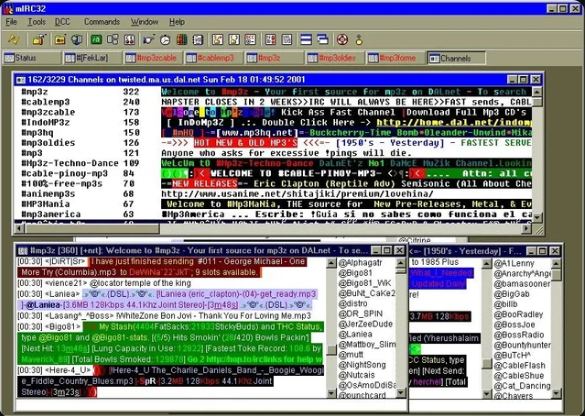
mIRC on DALnet - MP3 channels, colored text floods, and the multi-window chaos of IRC. This is what everyone was using alongside ICQ and AIM.
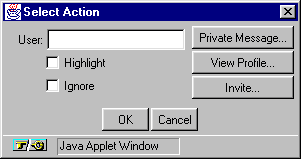
Yahoo Chat actions menu - the fourth player in the messenger wars

Yahoo Chat banner - the original 1998 header
The Messenger Wars
By the early 2000s, the instant messaging landscape was a four-way war: ICQ, AIM, MSN Messenger, and Yahoo Messenger. Each platform had its own user base, its own culture, its own exploits, and its own hacking tools. And none of them could talk to each other.
The Fragmentation Problem
The messenger wars created a fragmentation nightmare for users. Your school friends were on AIM. Your international friends were on ICQ. Your family was on MSN (because it came with Windows). Your tech-savvy friends were on Yahoo Messenger (or still on IRC). To stay connected with everyone, you had to run multiple clients simultaneously - each consuming memory, each with its own notification sounds, each with its own contact list.
This wasn't just inconvenient - it was a deliberate strategy. Each company wanted to lock users into their ecosystem. AOL actively blocked third-party clients from connecting to AIM. Microsoft tried to make MSN the default by bundling it with Windows. Yahoo offered interoperability with MSN briefly, then pulled it. The messenger wars were a preview of the platform lock-in battles that would define the smartphone era.
Yahoo Messenger
Yahoo Messenger deserves its own mention. Launched in 1998, it carved out a niche with features the others lacked: voice chat (years before Skype), webcam support (which became... exactly what you'd expect), chat rooms organized by topic, and Audibles - animated characters that delivered voice messages. Yahoo Messenger was particularly popular in Southeast Asia, India, and the Middle East.
Yahoo Messenger had its own exploit ecosystem: profile HTML injection, webcam hijacking tools, chat room flooding bots, and the infamous "Yahoo booters" that could disconnect users from chat rooms. The Yahoo chat rooms, in particular, were a Wild West of bot spam, age/sex/location queries, and automated flooding.
Multi-Protocol Clients: The Peace Treaties
The fragmentation problem spawned a category of software that tried to unite the warring factions: multi-protocol clients.
| Client | Platforms | Supported Protocols | Notable Features |
|---|---|---|---|
| Trillian | Windows | AIM, ICQ, MSN, Yahoo, IRC | First popular multi-protocol client. Skinnable UI. Plugin system. |
| Pidgin (GAIM) | Windows, Linux | AIM, ICQ, MSN, Yahoo, IRC, Jabber/XMPP, and 15+ more | Open source. Extensible via plugins. OTR encryption plugin. |
| Adium | macOS | Same as Pidgin (shared libpurple library) | Beautiful native Mac UI. Duck mascot. Beloved by Mac users. |
| Miranda IM | Windows | AIM, ICQ, MSN, Yahoo, IRC, Jabber | Extremely lightweight. Modular plugin architecture. Low resource usage. |
| Kopete | Linux (KDE) | AIM, ICQ, MSN, Yahoo, IRC, Jabber | KDE-integrated. Webcam support. Contact metadata. |
Trillian was the breakthrough. Released in 2000, it let you sign into AIM, ICQ, MSN, Yahoo, and IRC simultaneously from a single window. It was a revelation. Your entire social graph, unified. One contact list. One notification sound. One application. Trillian's popularity was a direct rebuke to the platform companies' lock-in strategies.
Pidgin (originally GAIM - "GTK+ AOL Instant Messenger") took the open-source approach. Built on the libpurple library, it supported an absurd number of protocols and became the standard messaging client on Linux. Its OTR (Off-the-Record) encryption plugin was one of the first practical implementations of end-to-end encrypted messaging - a concept that wouldn't go mainstream until Signal and WhatsApp adopted it over a decade later.
mIRC and IRC Scripting
mIRC scripting: many developers' first code
mIRC32 on DALnet, circa 2001 - MP3 trading channels, colored text floods, Napster-era file sharing, and the multi-window chaos that was IRC.
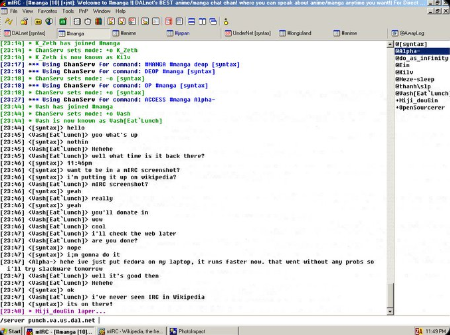
A live mIRC session - channel ops, mode changes, and the raw IRC protocol that a generation learned to read like a second language.
IRC bots ran 24/7 on shell accounts

Channel wars were fought with scripts
While ICQ, AIM, and MSN were the mainstream messengers, IRC (Internet Relay Chat) was the backbone of the internet's technical underground. And mIRC - the dominant Windows IRC client - was, for hundreds of thousands of people, their first introduction to programming.
mIRC: The Gateway Drug
mIRC, created by Khaled Mardam-Bey and first released in 1995, was shareware that almost nobody paid for (the "please register" dialog on startup was a meme in itself). But mIRC's killer feature wasn't its IRC client functionality - it was its built-in scripting language.
mIRC scripting was a full programming language disguised as a chat client feature. It had variables, loops, conditionals, file I/O, socket connections, dialog boxes, timers, and event handlers. You could write anything from a simple auto-greeting script to a full-featured bot to a complete application - all within mIRC's scripting engine.
For a generation of teenagers in the late 1990s, mIRC scripting was their first programming experience. They didn't set out to learn programming - they wanted to make their IRC client do cool things. They wanted colored text, ASCII art, automated responses, trivia bots, and yes - war scripts. The learning was incidental, driven by desire rather than curriculum. Many professional developers today trace their career back to writing mIRC scripts in their bedroom at 2 AM.
IRC Bots
IRC bots were automated programs that sat in channels and performed tasks. The most famous bot platform was Eggdrop, written in C with a Tcl scripting interface. Eggdrop bots ran on Unix shell accounts (another underground economy - "shells" were sold and traded for running bots and bouncers) and could:
- Channel Management: Auto-op trusted users, kick/ban rule violators, enforce topic locks, maintain channel settings across netsplits.
- Trivia & Games: Trivia bots were enormously popular. Channels dedicated to trivia games ran 24/7 with leaderboards and statistics.
- File Serving: XDCC bots served files via DCC (Direct Client-to-Client) transfers. These became the backbone of IRC-based file sharing - entire channels existed solely as file distribution networks.
- Information: Weather bots, URL title bots, dictionary bots, seen bots (tracking when a user was last active).
- War: Automated channel takeover and defense. Bot networks that could mass-join a channel, deop the existing operators, and seize control.
Channel Takeovers & IRC Wars
IRC channel takeovers were the most dramatic form of online conflict in the pre-social-media era. A channel takeover worked like this:
- Netsplit Exploitation: When an IRC server lost connection to the network (a "netsplit"), users on the split server couldn't see users on other servers. An attacker on the split side could create a channel with the same name, gain operator status, and when the servers reconnected, the IRC server would merge the two channels - sometimes giving the attacker operator status in the merged channel.
- Bot Armies: Attackers would join a channel with dozens of bots (often from compromised machines or purchased shell accounts). If they could get one bot opped, it would op all the others, and the bot army would mass-deop and kick the legitimate operators.
- ChanServ Exploits: On networks with channel registration services (ChanServ), attackers would try to steal the channel registration through social engineering, expired registrations, or exploits in the services software.
IRC wars between groups could last for months. Groups would DDoS each other's servers, hack each other's shell accounts, steal each other's channels, and write increasingly sophisticated war scripts. The drama was intense, personal, and - in retrospect - absurdly disproportionate to the stakes (control of a text chat room).
War Scripts & DCC Exploits
War scripts were mIRC scripts designed for offensive IRC operations. They included:
- Flood scripts: Rapid CTCP (Client-To-Client Protocol) requests that overwhelmed the target's client. CTCP PING, CTCP VERSION, and CTCP FINGER floods were common.
- Clone scripts: Connected multiple instances to a channel to inflate numbers or prepare for a takeover.
- Takeover scripts: Automated the channel takeover process - detect a netsplit, create the channel, gain ops, and execute the takeover when servers reconnect.
- DCC exploits: DCC (Direct Client-to-Client) connections were used for file transfers and direct chat. DCC SEND exploits could crash vulnerable clients by sending malformed file transfer requests. The infamous
$decodeexploit tricked users into executing mIRC script commands disguised as innocent-looking text. - CTCP floods: Sending rapid CTCP requests could cause the target to be disconnected by the server for "excess flood" - the server thought the victim was flooding because their client automatically responded to each CTCP request.
$decode trick. mIRC's scripting engine would evaluate certain expressions in incoming text. An attacker could send a message containing encoded mIRC script commands that, when displayed in the victim's client, would execute - potentially making the victim's client part all channels, send messages, or even download and run files. It was a social engineering attack wrapped in a technical exploit: "Hey, paste this into your mIRC to get free ops: //say $decode(...)". Thousands fell for it.
The Legacy
The ICQ era ended not with a bang but with a slow fade. By the mid-2000s, the messenger wars were being made irrelevant by new forces: Facebook Chat (2008) absorbed the social messaging use case. Skype (2003) dominated voice and video. BlackBerry Messenger (2005) moved messaging to mobile. And then the smartphone revolution - WhatsApp (2009), iMessage (2011), Telegram (2013) - made desktop messaging clients feel like relics of another age.
But the DNA of the ICQ era is everywhere in modern messaging. Every feature you use today has a direct ancestor in the late-90s messenger wars:
| ICQ Era Feature | Modern Descendant | Platform |
|---|---|---|
| ICQ flower status (Online/Away/DND) | Online status indicators, "Active now" | Discord, Slack, Teams |
| ICQ invisible mode | "Last seen" controls, invisible mode | WhatsApp, Telegram |
| AIM away messages | Status messages, stories | Slack, Discord, Instagram |
| AIM buddy list | Contact lists, friend lists | Every messaging app |
| MSN custom emoticons | Custom emoji, sticker packs | Discord, Telegram, Slack |
| MSN nudge | @mentions, notification sounds | Slack, Teams, Discord |
| ICQ random chat | Random matching | Omegle, Chatroulette |
| IRC channels | Servers and channels | Discord (directly inspired) |
| IRC bots | Chat bots, slash commands | Discord, Slack, Teams |
| Trillian/Pidgin multi-protocol | Platform bridges, Matrix protocol | Matrix, Beeper |
Security Lessons Learned
The ICQ era was a brutal education in computer security. The lessons learned - often the hard way - became foundational principles:
- Never trust the client: ICQ's peer-to-peer architecture trusted the client to be honest about the sender's identity. Spoofing tools proved that was naive. Modern messaging uses server-side validation for every message.
- Encrypt everything: ICQ, AIM, MSN, and Yahoo all transmitted messages in plaintext. The sniffing tools that exploited this led directly to the push for end-to-end encryption that culminated in Signal Protocol and its adoption by WhatsApp.
- Don't expose IP addresses: ICQ's IP revelation problem taught the industry that peer-to-peer connections between end users are a privacy disaster. Modern messengers route all traffic through servers.
- Sanitize all input: The HTML injection exploits in AIM profiles and ICQ away messages were early examples of XSS. They helped establish input sanitization as a fundamental security practice.
- Don't trust file transfers: The MSN worms demonstrated that social engineering via trusted contacts is devastatingly effective. This lesson is still being relearned with every new platform.
ICQ's Surprising Survival
Here's the twist: ICQ still exists. After being sold by AOL to Digital Sky Technologies (now VK/Mail.ru Group) in 2010 for a mere $187.5 million (less than half what AOL paid for it), ICQ was relaunched as a modern messaging app. It's now owned by VK and maintains a user base primarily in Russia and the former Soviet states. The "uh oh!" sound is still there. You can still log in with your original UIN if you remember it.
The fact that ICQ survives - diminished but alive - while AIM, MSN Messenger, and Yahoo Messenger are all dead is one of the great ironies of internet history. The scrappy Israeli startup outlasted the corporate giants.
The Generation That Grew Up Online
Perhaps the most important legacy of the ICQ era is the generation it shaped. The people who grew up with ICQ, AIM, MSN, and IRC - roughly those born between 1978 and 1992 - were the first generation to experience real-time digital social interaction during their formative years. They learned to navigate online identity, digital communication, privacy, and security through direct experience, often painful experience.
They learned that people online aren't always who they claim to be (spoofing). They learned that privacy is fragile (IP revealers). They learned that trust can be weaponized (MSN worms from "friends"). They learned that digital identity has real value (UIN theft). And they learned that technology is never neutral - every feature can be used and abused in ways its creators never intended.
These lessons, learned in the chaotic laboratory of late-90s instant messaging, are more relevant today than ever. The platforms have changed. The exploits have evolved. But the fundamental dynamics - identity, trust, privacy, and the tension between openness and security - remain exactly the same.
🕰️ Visit the past - still on the Wayback Machine: